ManyChat Notion Integration
Sync ManyChat with Notion automatically - tags, custom fields, flows, and growth tools always up to date, no coding needed.
Free to start. No credit card required.
Trusted worldwide
500+ teams stopped copying data manually.
Yours can too.













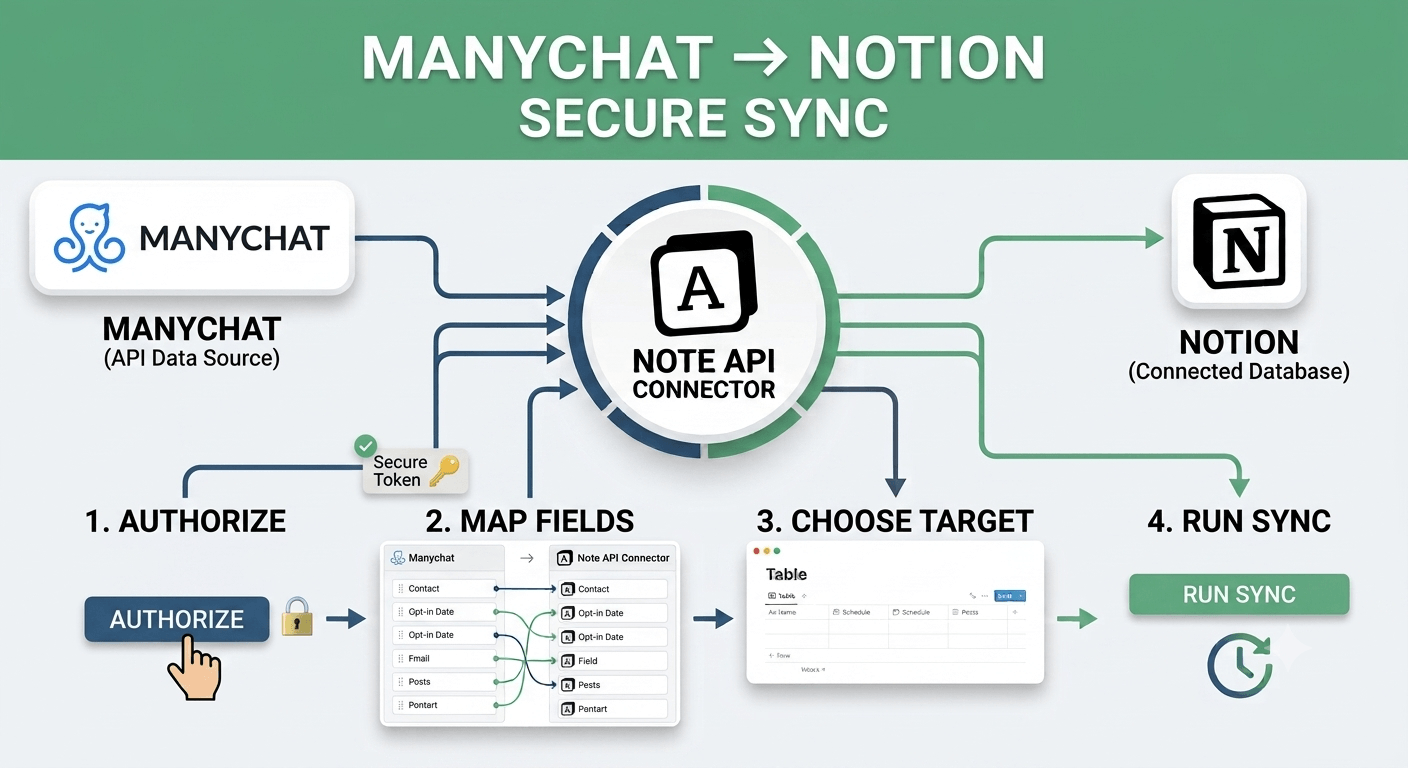
The ManyChat Notion integration lets you pull live chatbot data directly from your ManyChat account into Notion using Note API Connector. Whether you are documenting your tag structure, keeping a reference of custom user fields, tracking which automation flows are live, or monitoring your growth tools, this integration keeps your Notion databases in sync with ManyChat automatically.
With Note API Connector you can sync ManyChat with Notion on a fully automated schedule (hourly, daily, or at custom intervals) without writing a single line of code. Grab your ManyChat API token, choose a Notion database, map the fields visually, and your data flows into Notion on autopilot from that point forward.
How to connect ManyChat to Notion
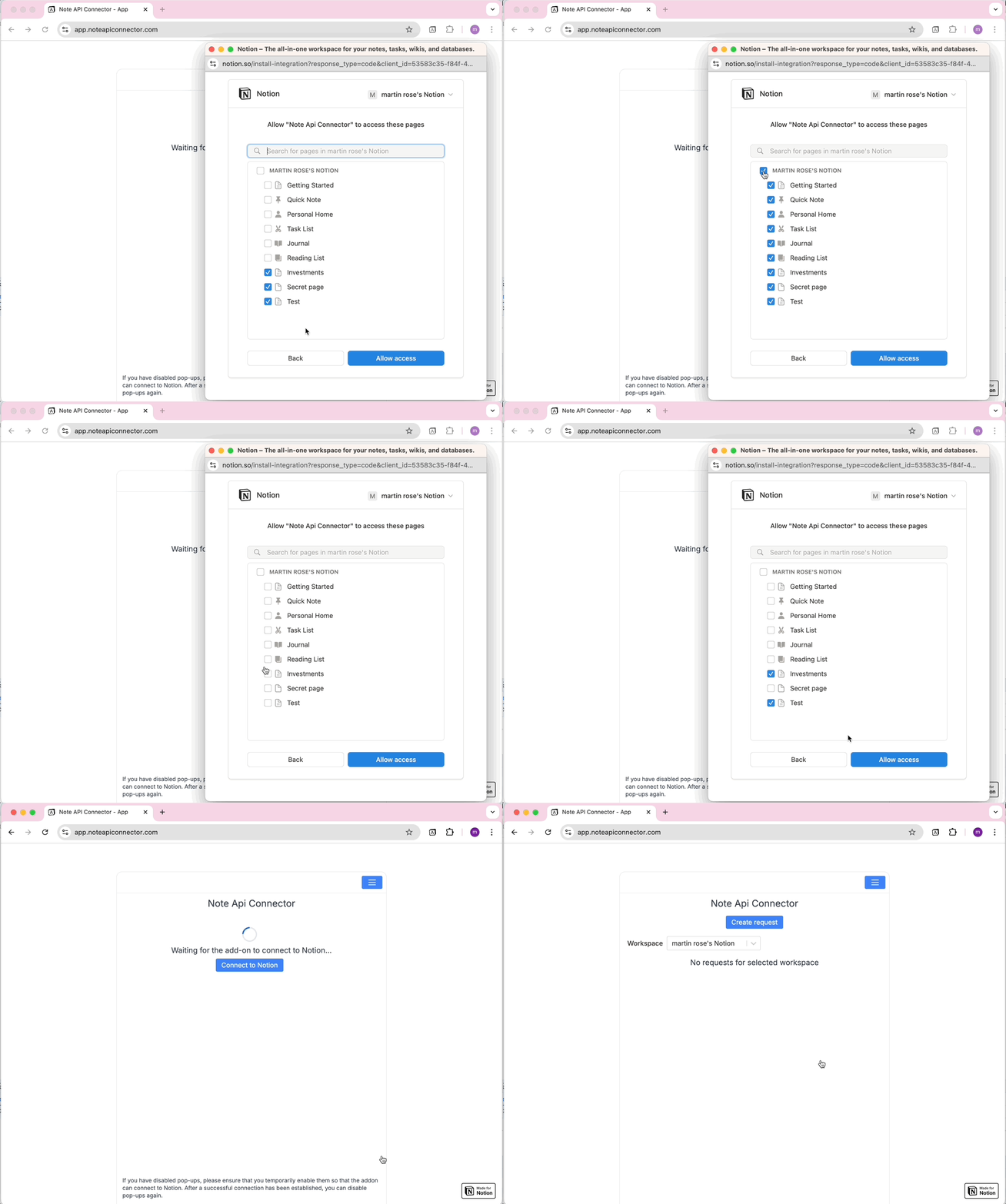
Connect your Notion workspace
Click Connect to Notion, authorize Note API Connector, and select the pages and workspace where your ManyChat data should appear.
Get your ManyChat API token and create your request
In ManyChat, open the account for the page you want to sync, go to Settings > API, and click Generate your API Key (each connected page has its own token). In Note API Connector, click Create Request and paste your ManyChat endpoint URL, for example https://api.manychat.com/fb/page/getTags. Open the Authorization tab, select Bearer Token, and paste your API token. Give the request a name and click Run.
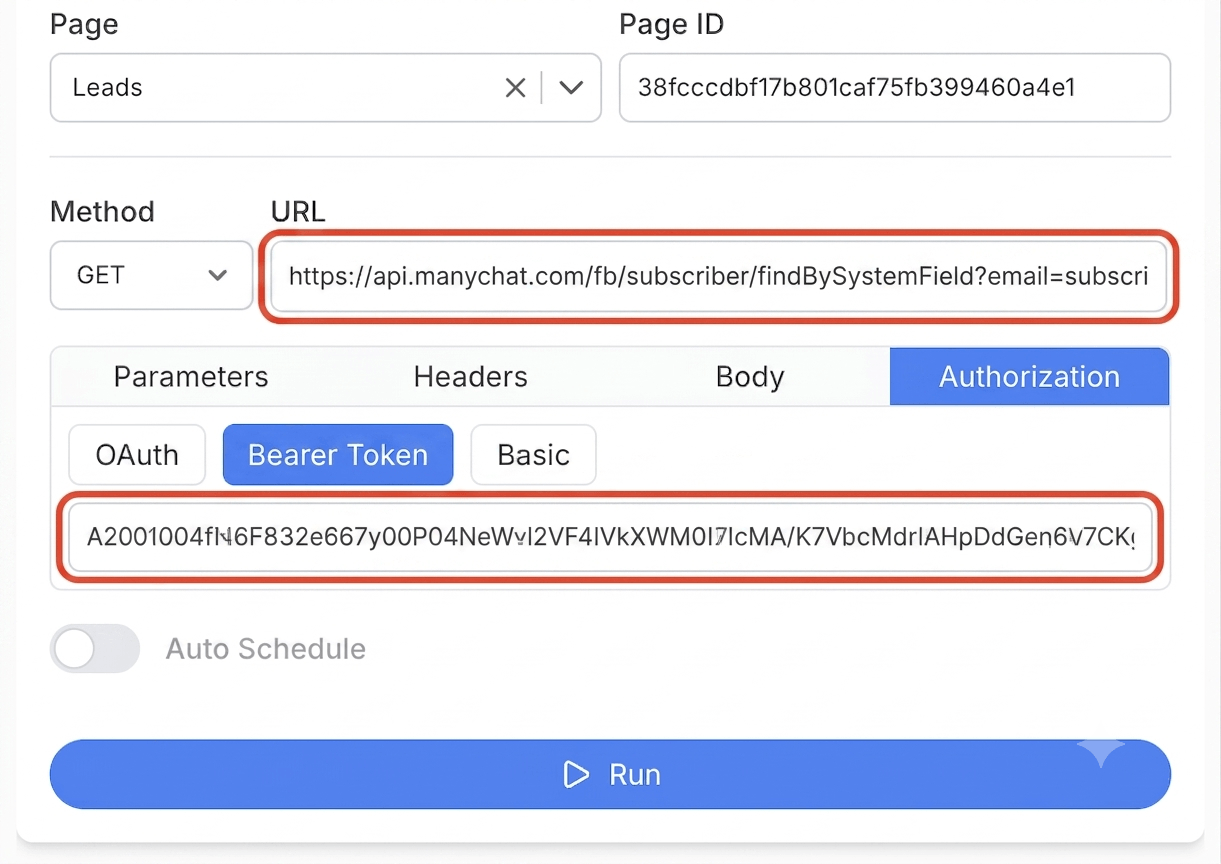
Choose your data and map fields
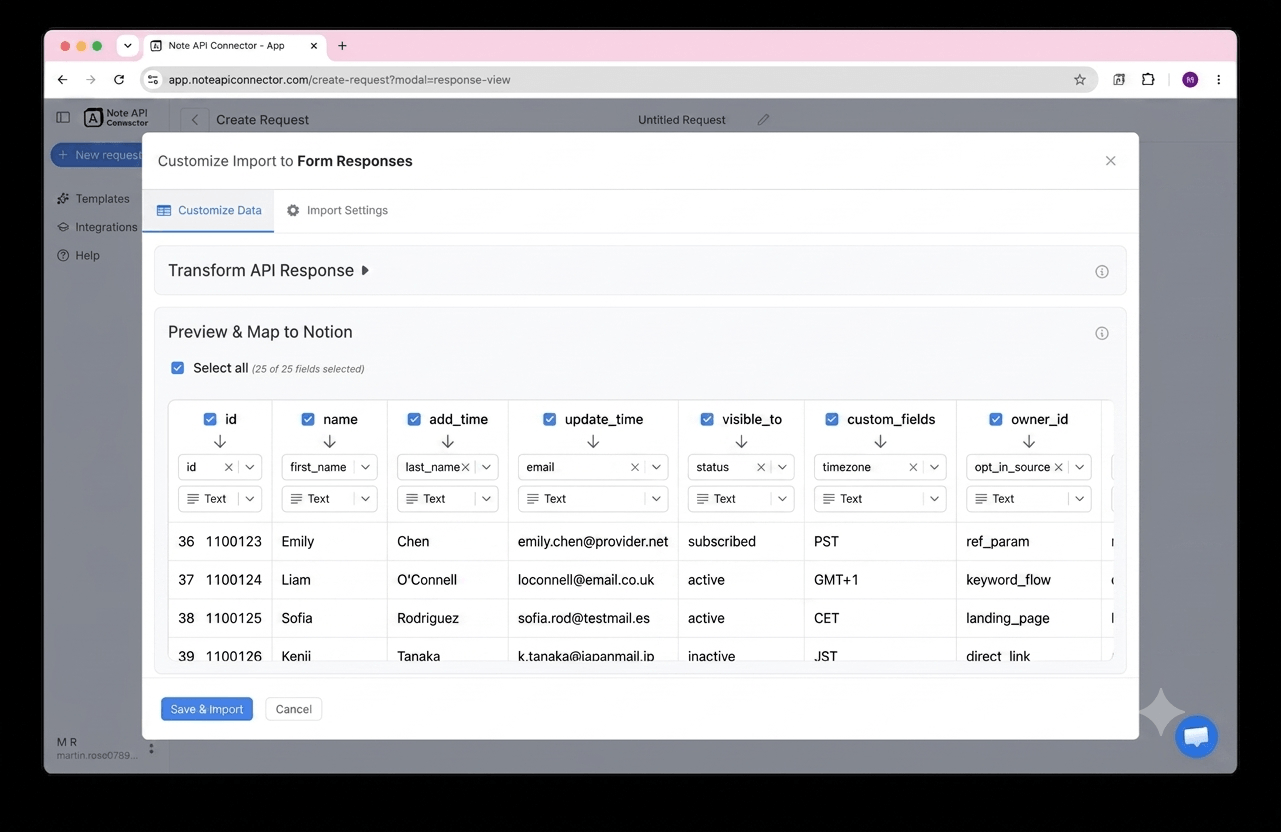
In the Response Field Mapping screen, select which ManyChat fields to include - such as tag name, custom field name and type, flow name, or growth tool name - and map each one to a Notion property. You can match existing properties, create new ones, or set the field type. Click Save & Import when you're done.
Set your sync schedule and go live
Enable Auto Schedule and choose your refresh interval. Your ManyChat data will sync with Notion automatically from that point forward, with no manual refreshes needed.
⏱ Hourly / Daily / Custom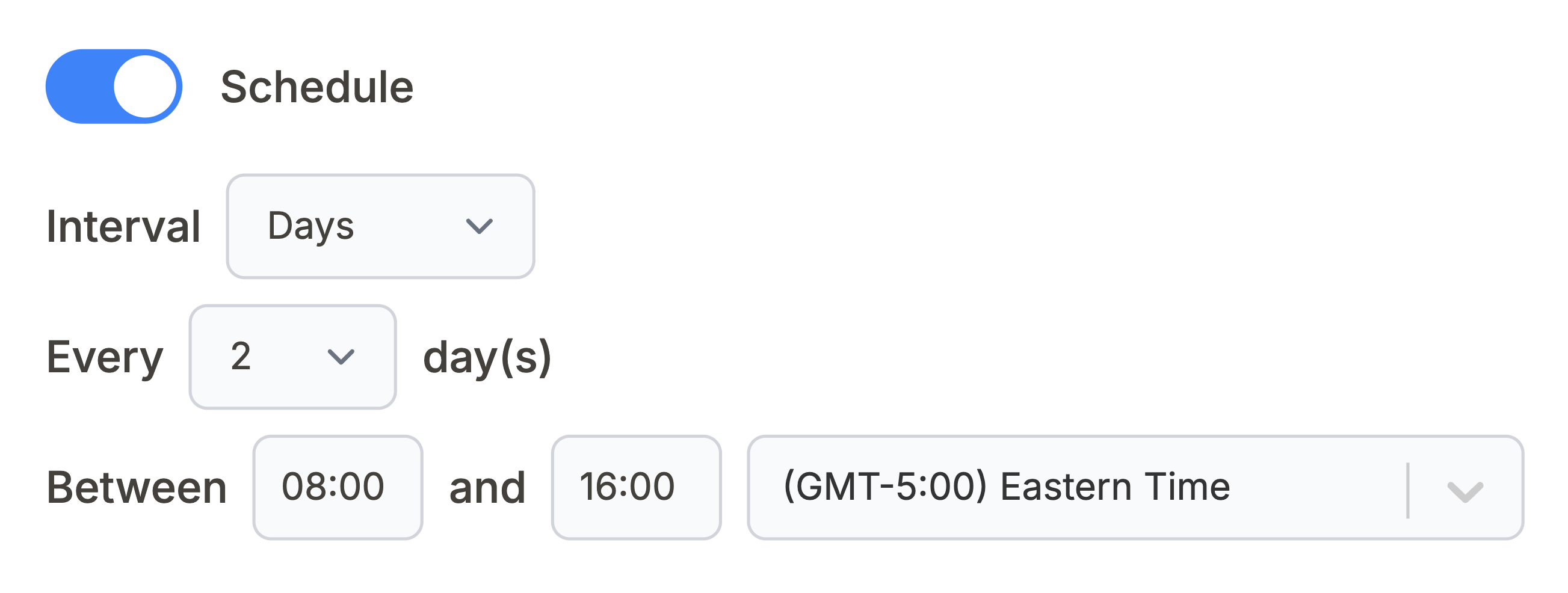
What ManyChat data can you sync with Notion?
Use these ManyChat API endpoints directly in Note API Connector. Each one can be mapped to a separate Notion database.
Basic details about your connected page, including name and connected channel. Keep a reference record of your ManyChat account setup inside Notion.
https://api.manychat.com/fb/page/getInfo
All tags used to segment subscribers, with tag name and ID. Use tags to categorize contacts or filter automation results inside Notion.
https://api.manychat.com/fb/page/getTags
All custom user fields with name, type, and description. Reference your custom data schema when mapping subscriber records inside Notion.
https://api.manychat.com/fb/page/getCustomFields
All automation flows with name and ID. Document which chatbot sequences are live and track your automation library inside Notion.
https://api.manychat.com/fb/page/getFlows
All growth tools (opt-in widgets) with name and status. Track which lead capture tools are active and driving new subscribers inside Notion.
https://api.manychat.com/fb/page/getGrowthTools
Look up a single subscriber by email or phone number, returning their name, tags, and custom field values. Useful for pulling specific contact records into a Notion CRM view.
https://api.manychat.com/fb/subscriber/[email protected]
See how it works
Why sync ManyChat with Notion?
Always up to date
Scheduled sync runs automatically. Your Notion database reflects live ManyChat data without any manual work.
No coding required
Point, click, and map fields. Connect ManyChat to Notion in minutes without any programming knowledge.
Custom schedule
Choose hourly, daily, or custom intervals. You control exactly when Notion pulls fresh data from ManyChat.
Conclusion
With Note API Connector, setting up a complete ManyChat Notion integration takes minutes, not days. Your tags, custom fields, flows, and growth tool data sync automatically into Notion on your chosen schedule, with no code and no manual copy-paste.
Whether you are documenting your chatbot automation structure, building a reference library of tags and custom fields, tracking which growth tools are driving signups, or giving your team a read-only view of your ManyChat setup in Notion, connecting ManyChat to Notion gives you the flexibility of Notion's interface with the real-time accuracy of ManyChat's data.
Frequently Asked Questions
Yes. ManyChat provides a REST API that exposes page information, tags, custom fields, flows, growth tools, and subscriber lookups. Note API Connector connects to this API directly using your API token to pull your ManyChat data into Notion on a scheduled basis.
In ManyChat, open Settings > API for the page you want to sync and click Generate your API Key. In Note API Connector, connect your Notion workspace, click Create Request, and paste a ManyChat endpoint URL such as https://api.manychat.com/fb/page/getTags. Open the Authorization tab, select Bearer Token, and paste your API token. Select your Notion database, map the fields visually, and run the import.
Not in bulk. ManyChat does not offer a single endpoint to list every subscriber, since messaging platforms restrict bulk exports of contact data for privacy reasons. Instead, the API supports looking up individual subscribers by email or phone using findBySystemField. You can still sync tags, custom fields, flows, and growth tool data in bulk.
Yes. Enable Auto Schedule in Note API Connector and choose your refresh interval: hourly, daily, or custom. Your ManyChat data will sync with Notion automatically on that schedule with no manual action required.
You can sync page information, tags, custom fields, automation flows, growth tools, and individual subscriber lookups. Each ManyChat endpoint can be mapped to a separate Notion database, so you can build a full chatbot documentation hub inside Notion.
No. Note API Connector is a no-code tool. You paste your ManyChat API endpoint URL, add your API token under Bearer Token authorization, select your Notion database, and map fields visually using the response field mapping view. No programming knowledge is needed.
Yes. Note API Connector uses your ManyChat API token for read-only data access. Your credentials are never stored on our servers, and Note API Connector never writes or modifies any data in your ManyChat account.