How to Color-Code Values in Notion Using the style() Formula
When working with numbers, statuses, or calculated values in Notion, raw data can be hard to scan quickly. With a Notion style formula, you can visually highlight important values using color, bold text, and background styling, directly inside a formula.
In this guide, you’ll learn how to use Notion’s style() function to
color-code formula outputs based on conditions, thresholds, or logic.
This approach works for metrics, progress indicators, scores, performance tracking,
and many other use cases.
Why Use style() in Notion Formulas?
Notion doesn’t offer native conditional formatting like spreadsheets, but formulas give you a powerful alternative.
- Highlight important values automatically
- Make dashboards easier to scan
- Reduce cognitive load when reviewing data
- Create visual hierarchy inside tables
- Build more professional-looking databases
A Notion style formula turns numbers and text into visual signals.
Understanding the style() Function
The style() function applies formatting to text output from a formula.
Multiple styles can be combined using commas.
.style("b,green,green_background,i")
This outputs text that is bold, italic, green, and displayed on a green background.
Common style() Options
.style("b")— bold.style("i")— italic.style("u")— underline.style("s")— strike-through.style("blue")— blue text.style("gray_background")— gray background
Color-Coding Positive vs. Negative Values
A common pattern is to visually distinguish positive and negative values.
if(
  prop("Value") >= 0,
  format(prop("Value")).style("b,green"),
  ("(" + format(abs(prop("Value"))) + ")").style("b,red")
)
This formula:
- Styles positive values in bold green
- Styles negative values in bold red
- Adds parentheses for negative values
Color-Coding Based on Thresholds
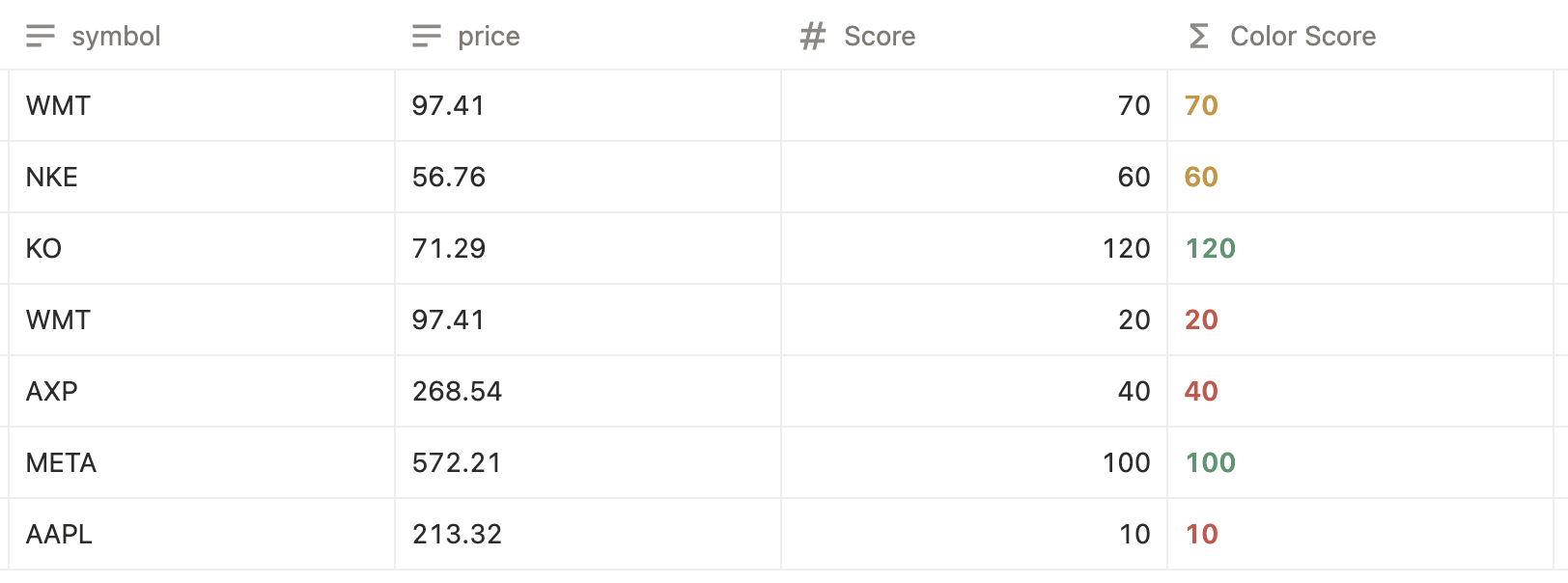
You can also apply styles based on numeric ranges or performance thresholds.
if(
  prop("Score") >= 80,
  format(prop("Score")).style("b,green"),
  if(
    prop("Score") >= 50,
    format(prop("Score")).style("b,yellow"),
    format(prop("Score")).style("b,red")
  )
)
This is useful for:
- Performance scores
- Health metrics
- Quality ratings
- Goal tracking
- Progress evaluation
Styling Related Properties with map()
You can also style values coming from related databases.
prop("Project")
  .map(
    current
      .prop("Project name")
      .style("b,blue")
  )
This is especially useful when highlighting related records in rollups or linked databases.
Final Thoughts
A Notion style formula gives you the closest thing to conditional formatting inside Notion. By combining logic, formatting, and thoughtful thresholds, you can build dashboards that communicate meaning instantly.
If you rely on numbers, scores, or calculated values in Notion, style-based formulas are a powerful upgrade.
Frequently Asked Questions
A Notion style formula uses the style() function to apply colors, bold text, or background formatting to formula outputs.
Yes. When formulas return text, you can apply color and formatting using the style() function.
No. Number values must be converted to text using format() before applying style().
Yes. While Notion does not have native conditional formatting, style() provides a powerful alternative using formulas.
They are commonly used for dashboards, score tracking, performance metrics, progress indicators, and data validation.