How to Create a Custom Progress Bar in Notion (Formula Examples)
Visual progress tracking can instantly make your Notion dashboards more motivating and easier to understand. Whether you’re managing tasks, tracking habits, or monitoring reading goals, a Notion progress bar formula lets you turn plain numbers into a clean, visual indicator.
In this guide, you’ll learn how to create a custom progress bar in Notion using formulas, Unicode characters, and percentage calculations.
How Notion Progress Bars Work (Concept Overview)
A Notion progress bar is typically built using:
- A percentage value (e.g. completion %)
- Unicode characters (★, █, ▓, ░, or emojis)
- The
substring()function - Optional rounding or formatting logic
The formula converts a number into a text-based visual bar.
Example 1: Simple Star-Based Progress Bar
This is one of the most popular and readable formats.
Formula
substring("★★★★★★★★★★", 0, round(prop("Progress") / 10)) +
substring("☆☆☆☆☆☆☆☆☆☆", 0, 10 - round(prop("Progress") / 10))
How It Works
- The bar has 10 total units
- Each ★ represents 10%
- Each ☆ represents remaining progress
Example Outputs
- 30% → ★★★☆☆☆☆☆☆☆
- 70% → ★★★★★★★☆☆☆
- 100% → ★★★★★★★★★★
Example 2: Block-Style Progress Bar
For a cleaner, more modern look:
substring("██████████", 0, floor(prop("Progress") / 10)) +
substring("░░░░░░░░░░", 0, 10 - floor(prop("Progress") / 10))
Perfect for dashboards and project trackers.
Example 3: Reading Progress Bar (Pages Read)
Track reading progress based on pages completed.
Properties Needed
- Pages Read (Number)
- Total Pages (Number)
Formula
substring(
  "██████████",
  0,
  floor(prop("Pages Read") / prop("Total Pages") * 10)
) +
substring(
  "░░░░░░░░░░",
  0,
  10 - floor(prop("Pages Read") / prop("Total Pages") * 10)
)
This creates a dynamic Notion reading progress bar that updates automatically.
Add Percentage Text to Your Progress Bar
To show both the bar and the percentage:
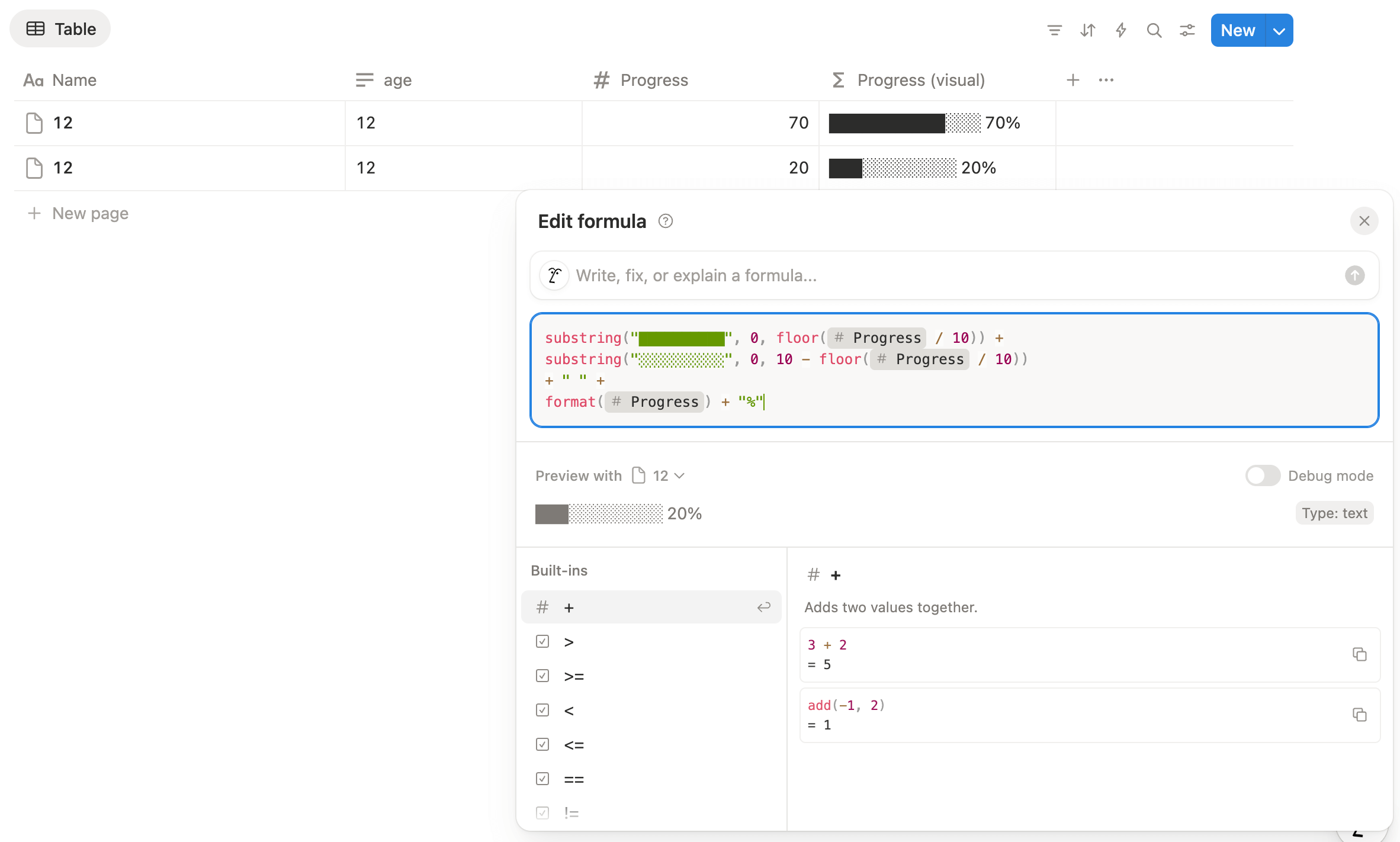
substring("██████████", 0, floor(prop("Progress") / 10)) +
substring("░░░░░░░░░░", 0, 10 - floor(prop("Progress") / 10))
+ " " +
format(prop("Progress")) + "%"
Example output:
██████░░░░ 60%
Final Thoughts
A Notion progress bar formula is one of the most effective ways to upgrade your
workspace visually without sacrificing flexibility. By combining substring(),
Unicode characters, and basic math, you can build powerful progress indicators for almost any
use case.
Frequently Asked Questions
A Notion progress bar formula is a text-based formula that uses Unicode characters and the substring() function to visually represent progress in Notion.
No. Notion does not currently offer a native progress bar, but you can create one using formulas and text characters.
You can create a progress bar by combining a percentage value with Unicode characters and the substring() function inside a Notion formula.
Yes. Notion progress bar formulas are commonly used for reading progress, habit tracking, project milestones, and task completion.
Yes. You can append the formatted percentage value to the end of your progress bar formula to show both visually.