How to Create an Emoji-Based Status in Notion Using Formulas
Keeping track of what’s complete, missing, or blocked in Notion doesn’t have to rely on plain text or manual status updates. With a Notion emoji status formula, you can instantly visualize progress, data quality, and task readiness using simple emojis like ✅ and ❌.
In this guide, you’ll learn how to create emoji-based status indicators in Notion using formulas, perfect for task tracking, content workflows, CRM systems, and dashboards.
Basic Example: Checkbox Status with Emojis
Use case:
- ✅ when a task is complete
- ❌ when it’s not
if(prop("Done"), "✅", "❌")
This formula checks whether the Done checkbox is checked and returns the appropriate emoji. It’s perfect for task lists, habit trackers, and daily planners.
Emoji Status for Missing Required Data
You can also detect missing information and flag it visually.
if(empty(prop("Due Date")), "❌ Missing", "✅ Complete")
Emoji Status Based on Multiple Conditions
More advanced workflows often require more logic.
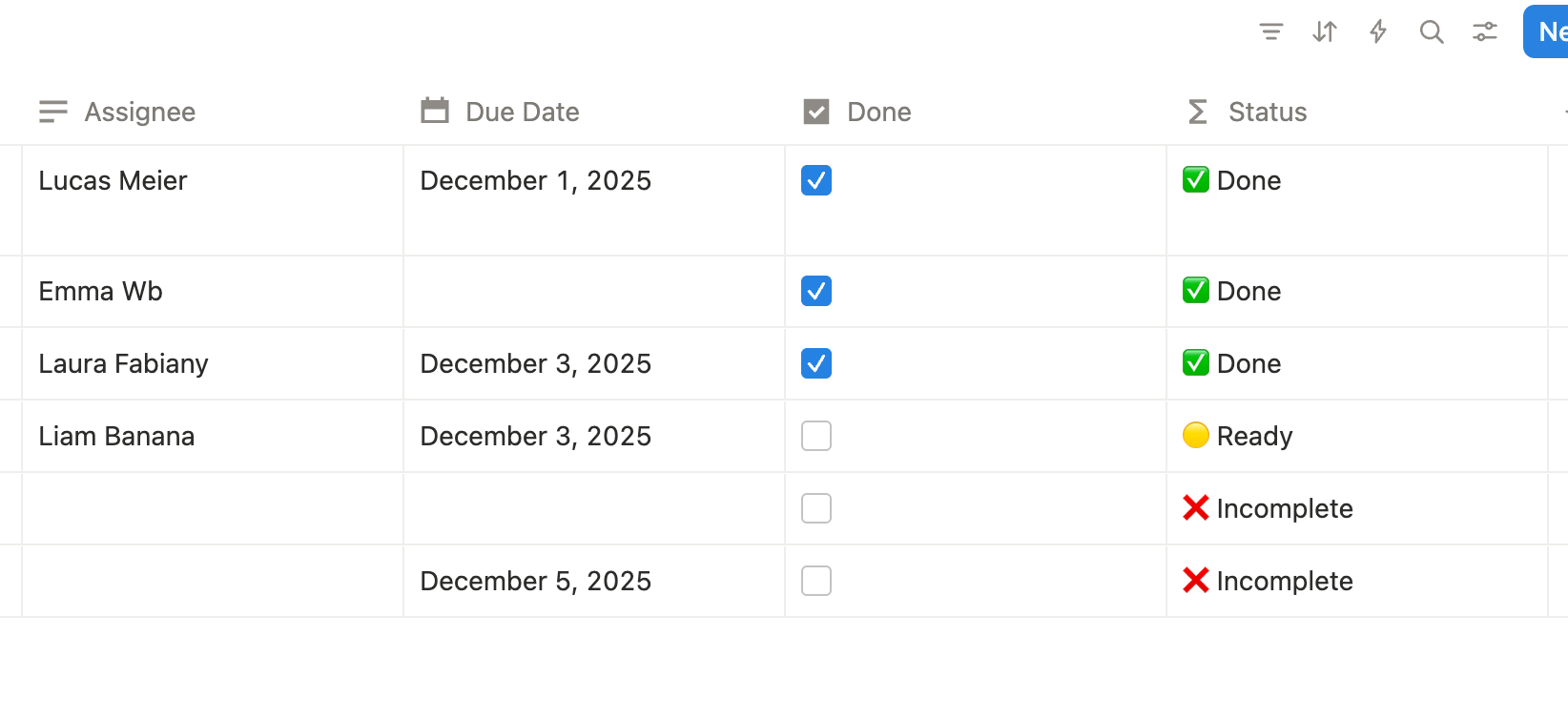
if(
  prop("Done"),
  "✅ Done",
  if(
    empty(prop("Assignee")) or empty(prop("Due Date")),
    "❌ Incomplete",
    "🟡 Ready"
  )
)
Status meaning:
- ✅ Done — task completed
- ❌ Incomplete — missing required data
- 🟡 Ready — ready to be worked on
Emoji-Only Status for Clean Dashboards
For minimal dashboards, you can use emoji-only output.
if(empty(prop("Link")), "❌", "✅")
This approach is ideal when space is limited and clarity matters most.
Best Use Cases for Emoji Status Formulas
- Task completion tracking
- Content publishing workflows
- CRM pipeline health
- Data validation checks
- Project readiness indicators
- Personal productivity dashboards
Emoji statuses work best when they are simple, consistent, and intentional.
Final Thoughts
A Notion emoji status formula is one of the simplest yet most powerful ways to improve clarity in your workspace. By combining formulas with emojis, you can instantly see what’s done, what’s missing, and what needs attention, without digging into individual pages.
Frequently Asked Questions
A Notion emoji status formula uses emojis in a formula output to visually indicate completion, missing data, or task status.
Yes. You can use an if() formula to display emojis like ✅ or ❌ depending on whether a checkbox is checked.
Use the empty() function to check whether a property has a value and return an emoji accordingly.
Yes. You can nest if() statements or combine logical conditions like OR and AND.
The emoji output is text, but you can sort and filter using the underlying properties that power the formula.