How to Create a Countdown to Deadline in Notion Using Formulas
Staying aware of upcoming deadlines is critical for productivity, goal tracking, and project management. With a Notion countdown formula, you can automatically calculate how many days remain until a due date or goal.
In this guide, you’ll learn how to create a dynamic countdown to a deadline in Notion
using formulas like dateBetween() and now(). This setup works perfectly
for tasks, goals, launches, and time-sensitive projects.
Why Use a Notion Countdown Formula?
Notion doesn’t provide a built-in countdown feature, but formulas make it easy to build one. A countdown formula allows you to:
- See how many days remain until a due date
- Track urgency at a glance
- Automatically update every day
- Highlight overdue tasks
- Build goal-oriented dashboards
A Notion countdown formula removes guesswork and keeps deadlines visible.
Basic Countdown Formula: Days Remaining
This is the simplest and most commonly used countdown setup.
Formula:
dateBetween(prop("Goal Date"), now(), "days")
This formula calculates the number of days between today and your goal or due date. The value updates automatically as time passes.
How It Works
prop("Goal Date")→ your target or due datenow()→ the current date and time"days"→ returns the difference in days
The result appears as a Number property showing days remaining.
Handling Overdue Dates
When the goal date has passed, the countdown will return a negative number. You can make this more user-friendly.
if(
  dateBetween(prop("Goal Date"), now(), "days") < 0,
  "Overdue",
  format(dateBetween(prop("Goal Date"), now(), "days")) + " days left"
)
This helps you instantly identify overdue tasks in your database.
Countdown with Urgency Labels
You can add urgency logic to your countdown formula.
if(
  dateBetween(prop("Goal Date"), now(), "days") <= 3,
  "🔴 Urgent",
  if(
    dateBetween(prop("Goal Date"), now(), "days") <= 7,
    "🟡 Soon",
    "🟢 On track"
  )
)
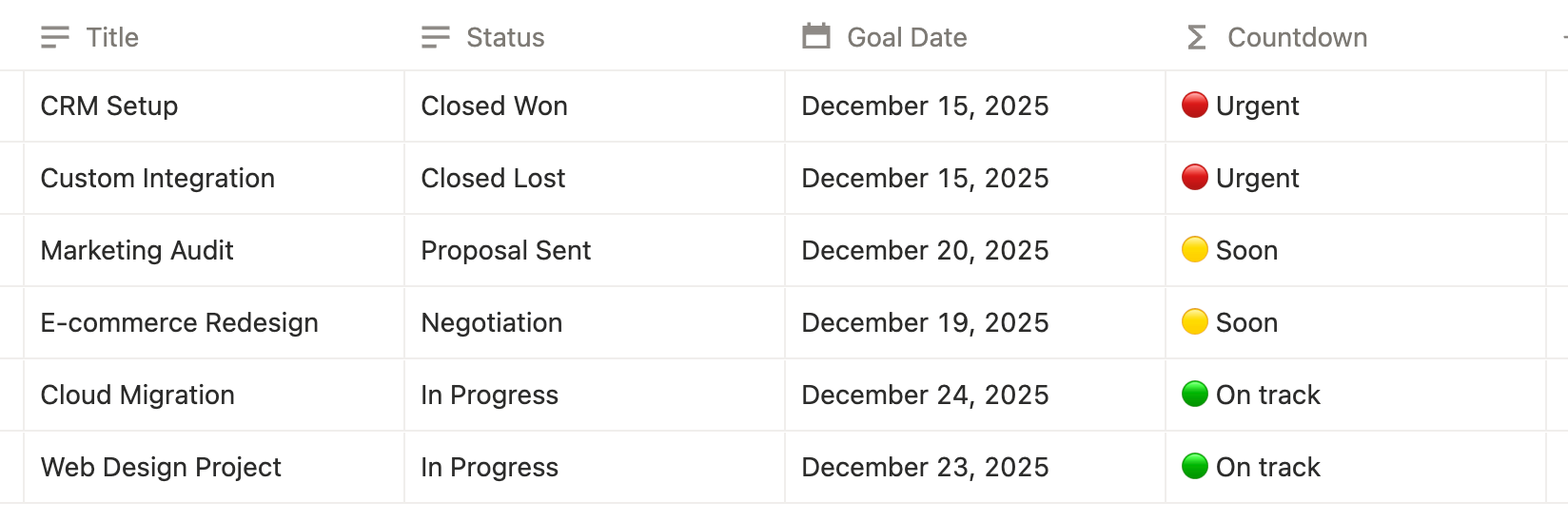
This is ideal for dashboards where visual prioritization matters.
Best Use Cases for Countdown Formulas
- Task and project deadlines
- Goal tracking
- Product launches
- Content publishing schedules
- Study plans and exams
- Personal productivity systems
Final Thoughts
A Notion countdown formula is one of the most practical formulas you can add to your workspace. By calculating days remaining automatically, you gain clarity, urgency, and focus.
Whether you’re managing projects, goals, or personal deadlines, countdown formulas help you stay ahead of time instead of reacting to it.
Frequently Asked Questions
A Notion countdown formula calculates the number of days remaining until a due date or goal using dateBetween() and now().
Use dateBetween(prop("Goal Date"), now(), "days") to calculate the remaining days dynamically.
Yes. Since the formula uses now(), the countdown updates automatically each day.
The formula returns a negative number, which you can handle with conditional logic to show an overdue status.
Yes. Countdown formulas are commonly used for goals, project deadlines, launches, exams, and content schedules.