How to Calculate Age in Notion Using Formulas
Calculating age automatically is a common requirement when working with people-related data in Notion. Whether you’re managing a contact list, a CRM, a team directory, or personal records, a Notion age formula allows you to determine someone’s current age dynamically.
In this guide, you’ll learn how to calculate age from a birth date using Notion formulas, and how to categorize age groups using conditional logic.
How Age Calculation Works in Notion
Notion calculates age by measuring the difference between today’s date and a stored
birth date using the dateBetween() function.
dateBetween(today(), prop("Birth Date"), "years")
This formula returns the number of full years between the two dates, which represents the current age.
Basic Example: Calculate Age in Years
To get started, make sure you have:
- A Date property called Birth Date
- A Formula property called Age
dateBetween(today(), prop("Birth Date"), "years")
This formula updates automatically as time passes, ensuring the age is always current.
Advanced Example: Categorize Age Groups
You can extend the age calculation by assigning categories based on age ranges. This is useful for segmentation, filtering, or automation.
ifs(
  dateBetween(today(), prop("Birth Date"), "years") < 18,
  "Kid",

  dateBetween(today(), prop("Birth Date"), "years") >= 18 &&
  dateBetween(today(), prop("Birth Date"), "years") < 65,
  "Adult",
  "Senior"
)
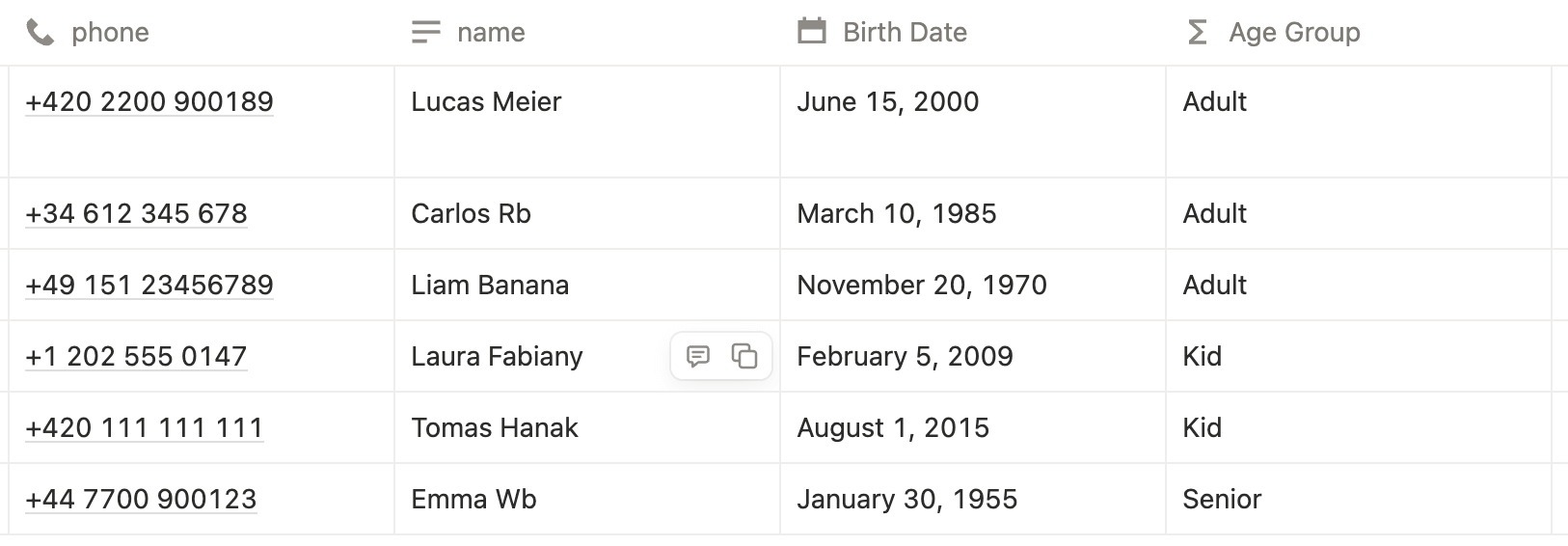
What This Formula Does
- Calculates the current age dynamically
- Assigns labels based on age range
- Updates automatically over time
- Works without manual intervention
Practical Use Cases for Age Formulas
- Contact and CRM databases
- Membership or customer directories
- Team or volunteer management
- Personal records and life logs
- Event eligibility tracking
By combining age formulas with filters and views, you can quickly segment records without duplicating data.
Final Thoughts
A Notion age formula is a simple yet powerful way to keep your databases
accurate and future-proof. By leveraging dateBetween() and conditional logic,
you can calculate age, categorize records, and automate workflows with ease.
If you work with people-related data in Notion, this formula is a must-have.
Frequently Asked Questions
A Notion age formula calculates a person’s current age by measuring the difference between today’s date and a birth date using dateBetween().
Use the formula dateBetween(today(), prop("Birth Date"), "years") to return the current age in years.
Yes. The formula recalculates automatically as time passes, keeping the age accurate.
Use today() when you only need date-level accuracy. now() includes time and is usually unnecessary for age calculations.